> ## Documentation Index
> Fetch the complete documentation index at: https://docs.monieswitch.com/llms.txt
> Use this file to discover all available pages before exploring further.
# Introduction
Customer Wallets are created by merchants to provide their customers with dedicated accounts for secure fund management and seamless transactions within the Monieswitch ecosystem.
Customer Wallets allow merchants to create and manage individual accounts for their customers, enabling secure transactions, recurring payments, and efficient fund management. These wallets are designed to integrate seamlessly with services like collections and recurring billing, providing merchants with a robust system for handling customer funds.
## Creating a Customer Wallet
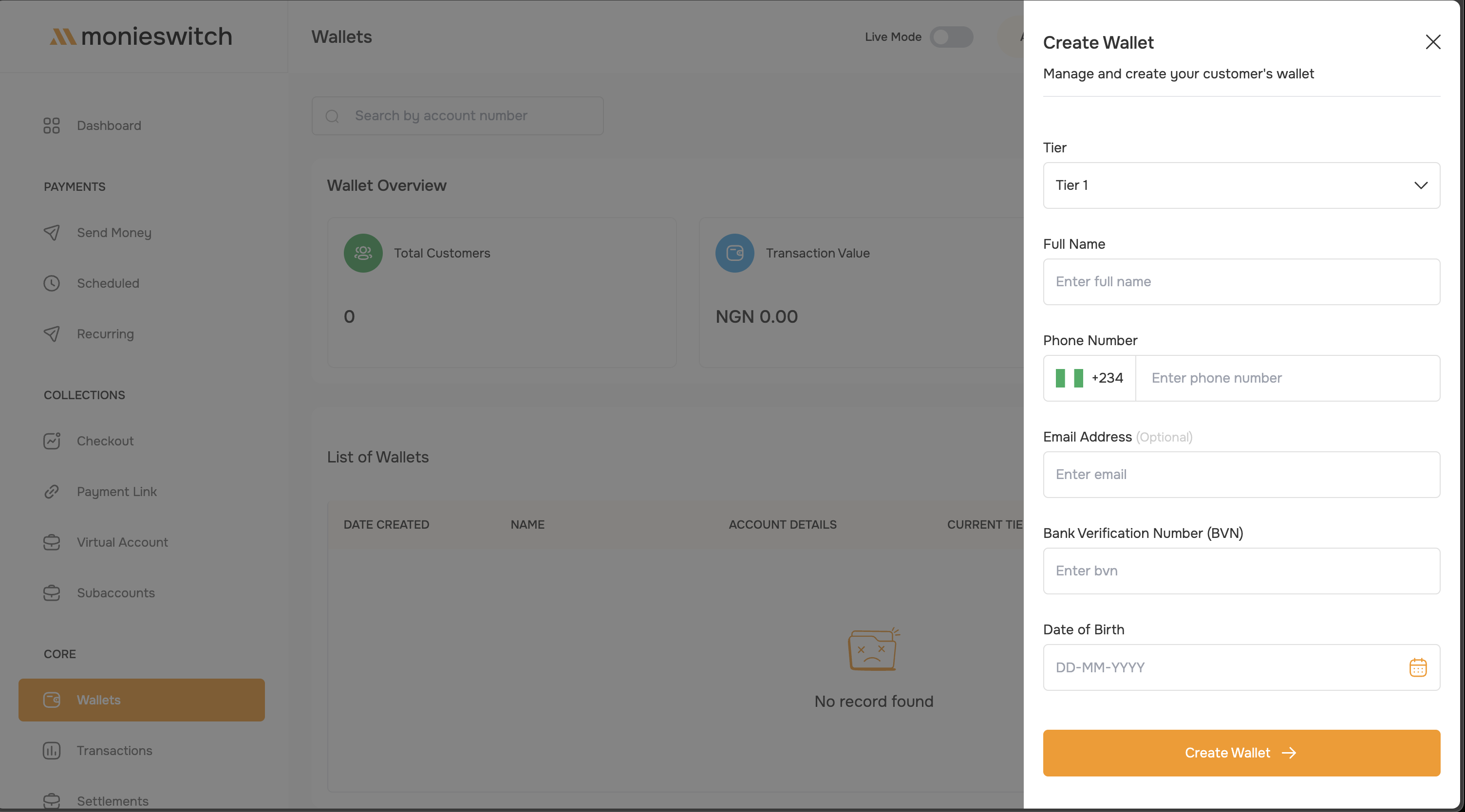
The wallet creation process is straightforward and tier-based. Here's what you need to provide:
 ### Required Information
Choose the appropriate tier (Tier 1, 2, or 3) based on your customer's transaction needs and compliance requirements.
Provide essential customer details:
* **Full Name** - Customer's complete legal name
* **Phone Number** - With country code (e.g., +234 for Nigeria)
* **Email Address** (Optional) - For notifications and communications
Complete KYC requirements based on selected tier:
* **Bank Verification Number (BVN)** - Required for all tiers
* **Date of Birth** - In DD-MM-YYYY format
* **Additional requirements** - Based on tier level (see Tier Requirements below)
Click "Create Wallet" to process the application. The wallet will be created instantly with a unique account number.
## Key Features
Merchants can select different wallet tiers to:
* Set appropriate transaction limits
* Define creation requirements
* Manage risk levels efficiently
* Control maximum balance caps
Each Customer Wallet comes with:
* Unique account identifier
* Individual balance management
* Personal transaction history
* Real-time balance tracking
Built-in features ensure:
* AML compliance
* Transaction monitoring
* Risk assessment
* Regulatory adherence
Direct integration with:
* Payment collections
* Recurring billing
* Automated transfers
* Wallet-to-wallet transactions
## Tier Requirements & Limits
**Transaction Limits**
* **Daily Limit:** ₦50,000
* **Maximum Balance:** ₦50,000
**Required Information**
* Full Name
* Phone Number
* Email Address (Optional)
* Bank Verification Number (BVN)
* Date of Birth
Tier 1 is ideal for basic transactions and entry-level customers
**Transaction Limits**
* **Daily Limit:** ₦200,000
* **Maximum Balance:** ₦200,000
**Required Information**
**All Tier 1 requirements, plus:**
* National Identity Number (NIN)
Tier 2 is suitable for moderate transaction volumes and regular customers
**Transaction Limits**
* **Daily Limit:** ₦5,000,000
* **Maximum Balance:** Unlimited
**Required Information**
* *All Tier 2 requirements, plus:*
* Valid Government-Issued ID (one of):
* Voter's Card
* NIN Slip
* Driver's License
* International Passport
* Residential address (text format)
* Proof of Address document (one of):
* Utility Bill
* Water Bill
* Internet Bill
* Electricity Bill
* Real-time selfie/image capture
All documents must be recent (within 3 months) and clearly show customer name and address
## Use Cases
Investment platforms can use Customer Wallets to:
* Manage individual investor accounts
* Process investment contributions
* Handle dividend distributions
* Track investment returns
* Facilitate withdrawals
Digital banks can leverage Customer Wallets for:
* Account balance management
* Bill payments
* Peer-to-peer transfers
* Standing orders
* Direct debits
Subscription-based businesses can utilize Customer Wallets to:
* Process recurring payments
* Handle subscription upgrades/downgrades
* Manage refunds
* Track payment history
* Store payment preferences
Online marketplaces can use Customer Wallets for:
* Buyer and seller account management
* Escrow services
* Quick checkout experiences
* Refund processing
* Loyalty rewards management
## Wallet Management
Once created, wallets can be managed through the dashboard:
### Required Information
Choose the appropriate tier (Tier 1, 2, or 3) based on your customer's transaction needs and compliance requirements.
Provide essential customer details:
* **Full Name** - Customer's complete legal name
* **Phone Number** - With country code (e.g., +234 for Nigeria)
* **Email Address** (Optional) - For notifications and communications
Complete KYC requirements based on selected tier:
* **Bank Verification Number (BVN)** - Required for all tiers
* **Date of Birth** - In DD-MM-YYYY format
* **Additional requirements** - Based on tier level (see Tier Requirements below)
Click "Create Wallet" to process the application. The wallet will be created instantly with a unique account number.
## Key Features
Merchants can select different wallet tiers to:
* Set appropriate transaction limits
* Define creation requirements
* Manage risk levels efficiently
* Control maximum balance caps
Each Customer Wallet comes with:
* Unique account identifier
* Individual balance management
* Personal transaction history
* Real-time balance tracking
Built-in features ensure:
* AML compliance
* Transaction monitoring
* Risk assessment
* Regulatory adherence
Direct integration with:
* Payment collections
* Recurring billing
* Automated transfers
* Wallet-to-wallet transactions
## Tier Requirements & Limits
**Transaction Limits**
* **Daily Limit:** ₦50,000
* **Maximum Balance:** ₦50,000
**Required Information**
* Full Name
* Phone Number
* Email Address (Optional)
* Bank Verification Number (BVN)
* Date of Birth
Tier 1 is ideal for basic transactions and entry-level customers
**Transaction Limits**
* **Daily Limit:** ₦200,000
* **Maximum Balance:** ₦200,000
**Required Information**
**All Tier 1 requirements, plus:**
* National Identity Number (NIN)
Tier 2 is suitable for moderate transaction volumes and regular customers
**Transaction Limits**
* **Daily Limit:** ₦5,000,000
* **Maximum Balance:** Unlimited
**Required Information**
* *All Tier 2 requirements, plus:*
* Valid Government-Issued ID (one of):
* Voter's Card
* NIN Slip
* Driver's License
* International Passport
* Residential address (text format)
* Proof of Address document (one of):
* Utility Bill
* Water Bill
* Internet Bill
* Electricity Bill
* Real-time selfie/image capture
All documents must be recent (within 3 months) and clearly show customer name and address
## Use Cases
Investment platforms can use Customer Wallets to:
* Manage individual investor accounts
* Process investment contributions
* Handle dividend distributions
* Track investment returns
* Facilitate withdrawals
Digital banks can leverage Customer Wallets for:
* Account balance management
* Bill payments
* Peer-to-peer transfers
* Standing orders
* Direct debits
Subscription-based businesses can utilize Customer Wallets to:
* Process recurring payments
* Handle subscription upgrades/downgrades
* Manage refunds
* Track payment history
* Store payment preferences
Online marketplaces can use Customer Wallets for:
* Buyer and seller account management
* Escrow services
* Quick checkout experiences
* Refund processing
* Loyalty rewards management
## Wallet Management
Once created, wallets can be managed through the dashboard:
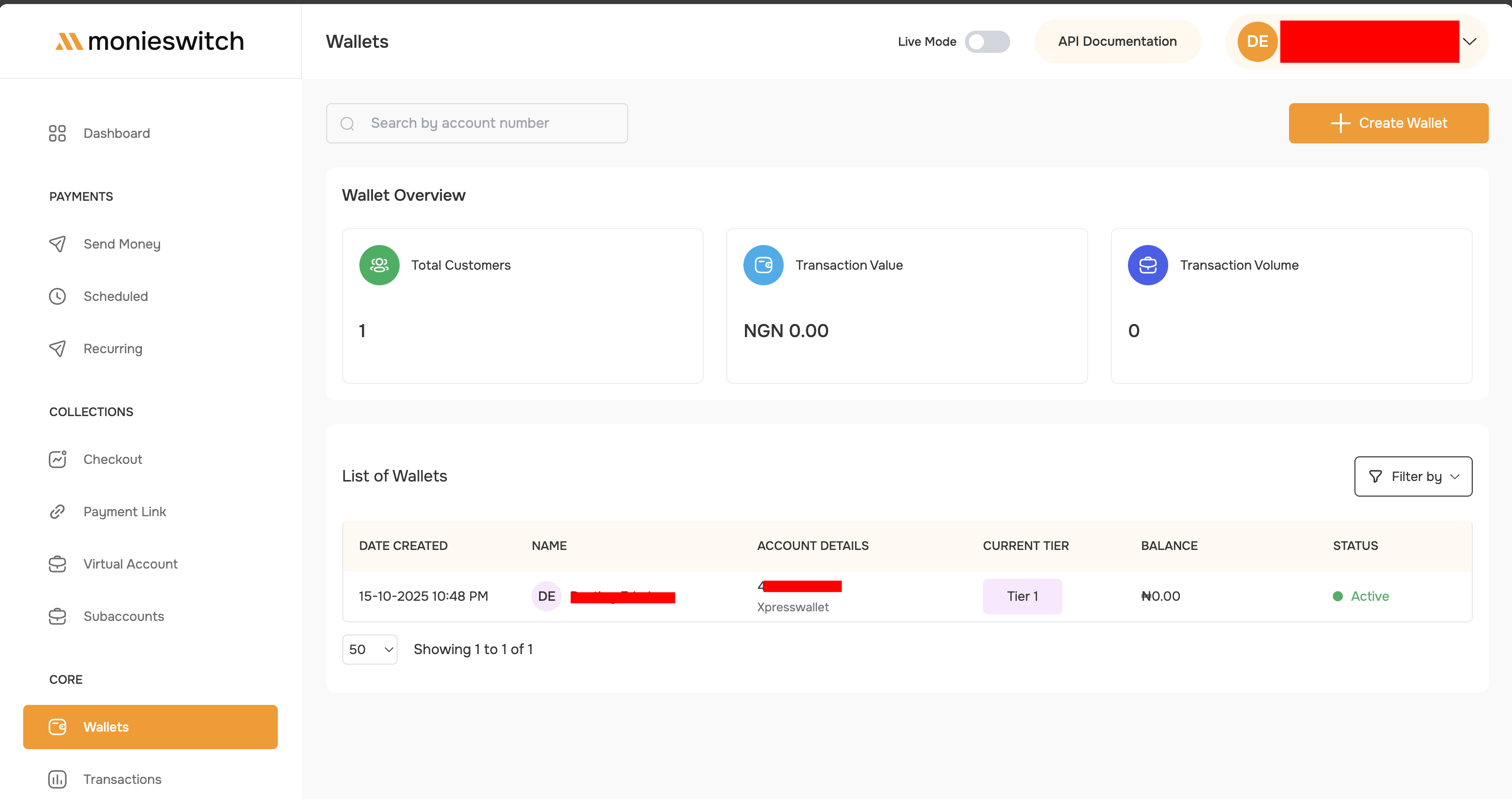 * **View All Wallets** - Access a comprehensive list of all customer wallets
* **Filter Options** - Sort by tier, status, date created, or balance
* **Search Functionality** - Find wallets by account number or customer details
* **Status Monitoring** - Track active, inactive, or suspended wallets
* **Transaction History** - View detailed transaction logs for each wallet
## Security & Compliance
All transactions are monitored for suspicious activity and automatically flagged for unusual patterns. Monieswitch ensures compliance with Nigerian financial regulations and CBN guidelines.
### Transaction Monitoring
* Automatic suspicious activity detection
* Real-time transaction validation
* Compliance with AML/CFT regulations
* Daily limit enforcement
* Automated risk scoring
### Data Protection
* Encrypted customer information
* Secure BVN verification
* PCI-DSS compliant infrastructure
* Regular security audits
## API Examples
```sh Create Customer Wallet (Tier 1) theme={"system"}
curl --location 'https://nini.monieswitch.com/wallet' \
--header 'Authorization: Bearer {{merchantAPIKey}}' \
--form 'name="John Doe"' \
--form 'email="john.doe@example.com"' \
--form 'phoneNumber="2348012345678"' \
--form 'tier="1"' \
--form 'dateOfBirth="15-03-1990"' \
--form 'bvn="22234567890"'
```
```sh Create Customer Wallet (Tier 3) theme={"system"}
curl --location 'https://nini.monieswitch.com/wallet' \
--header 'Authorization: Bearer {{merchantAPIKey}}' \
--form 'name="Jane Smith"' \
--form 'email="jane.smith@example.com"' \
--form 'phoneNumber="2348098765432"' \
--form 'tier="3"' \
--form 'dateOfBirth="22-07-1988"' \
--form 'bvn="22345678901"' \
--form 'nin="12345678901"' \
--form 'address="15, Victoria Island, Lagos"' \
--form 'documentId=@"/path/to/government-id.jpg"' \
--form 'proofOfAddress=@"/path/to/utility-bill.pdf"' \
--form 'selfie=@"/path/to/selfie.jpg"'
```
```sh Get Wallet Balance theme={"system"}
curl --location 'https://nini.monieswitch.com/wallet/customer/balance?walletId=16c8c17b-8a66-4f8b-b195-269e92f831ae' \
--header 'Authorization: Bearer {{merchantAPIKey}}'
```
```sh Wallet-to-Wallet Transfer theme={"system"}
curl --location 'https://nini.monieswitch.com/wallet/transfer' \
--header 'Authorization: Bearer {{merchantAPIKey}}' \
--header 'Content-Type: application/json' \
--data '{
"amount": 5000,
"pin": "1234",
"narration": "Payment for services",
"metadata": {"reference": "INV-001"},
"toWalletId": "eb8b935f-188e-40f5-b27a-6d8f1ba408f1",
"fromWalletId": "0ed45265-c7bc-44c4-9669-c521415c2958"
}'
```
```sh List All Wallets theme={"system"}
curl --location 'https://nini.monieswitch.com/wallet/list?page=1&limit=50' \
--header 'Authorization: Bearer {{merchantAPIKey}}'
```
***
## Next Steps
Learn more about tier requirements and limits
Explore complete API documentation
Manage wallet transactions and transfers
Understand KYC and AML requirements
* **View All Wallets** - Access a comprehensive list of all customer wallets
* **Filter Options** - Sort by tier, status, date created, or balance
* **Search Functionality** - Find wallets by account number or customer details
* **Status Monitoring** - Track active, inactive, or suspended wallets
* **Transaction History** - View detailed transaction logs for each wallet
## Security & Compliance
All transactions are monitored for suspicious activity and automatically flagged for unusual patterns. Monieswitch ensures compliance with Nigerian financial regulations and CBN guidelines.
### Transaction Monitoring
* Automatic suspicious activity detection
* Real-time transaction validation
* Compliance with AML/CFT regulations
* Daily limit enforcement
* Automated risk scoring
### Data Protection
* Encrypted customer information
* Secure BVN verification
* PCI-DSS compliant infrastructure
* Regular security audits
## API Examples
```sh Create Customer Wallet (Tier 1) theme={"system"}
curl --location 'https://nini.monieswitch.com/wallet' \
--header 'Authorization: Bearer {{merchantAPIKey}}' \
--form 'name="John Doe"' \
--form 'email="john.doe@example.com"' \
--form 'phoneNumber="2348012345678"' \
--form 'tier="1"' \
--form 'dateOfBirth="15-03-1990"' \
--form 'bvn="22234567890"'
```
```sh Create Customer Wallet (Tier 3) theme={"system"}
curl --location 'https://nini.monieswitch.com/wallet' \
--header 'Authorization: Bearer {{merchantAPIKey}}' \
--form 'name="Jane Smith"' \
--form 'email="jane.smith@example.com"' \
--form 'phoneNumber="2348098765432"' \
--form 'tier="3"' \
--form 'dateOfBirth="22-07-1988"' \
--form 'bvn="22345678901"' \
--form 'nin="12345678901"' \
--form 'address="15, Victoria Island, Lagos"' \
--form 'documentId=@"/path/to/government-id.jpg"' \
--form 'proofOfAddress=@"/path/to/utility-bill.pdf"' \
--form 'selfie=@"/path/to/selfie.jpg"'
```
```sh Get Wallet Balance theme={"system"}
curl --location 'https://nini.monieswitch.com/wallet/customer/balance?walletId=16c8c17b-8a66-4f8b-b195-269e92f831ae' \
--header 'Authorization: Bearer {{merchantAPIKey}}'
```
```sh Wallet-to-Wallet Transfer theme={"system"}
curl --location 'https://nini.monieswitch.com/wallet/transfer' \
--header 'Authorization: Bearer {{merchantAPIKey}}' \
--header 'Content-Type: application/json' \
--data '{
"amount": 5000,
"pin": "1234",
"narration": "Payment for services",
"metadata": {"reference": "INV-001"},
"toWalletId": "eb8b935f-188e-40f5-b27a-6d8f1ba408f1",
"fromWalletId": "0ed45265-c7bc-44c4-9669-c521415c2958"
}'
```
```sh List All Wallets theme={"system"}
curl --location 'https://nini.monieswitch.com/wallet/list?page=1&limit=50' \
--header 'Authorization: Bearer {{merchantAPIKey}}'
```
***
## Next Steps
Learn more about tier requirements and limits
Explore complete API documentation
Manage wallet transactions and transfers
Understand KYC and AML requirements