> ## Documentation Index
> Fetch the complete documentation index at: https://docs.monieswitch.com/llms.txt
> Use this file to discover all available pages before exploring further.
# Operations
Manage all wallet operations including creation, transactions, upgrades, and
account controls through our comprehensive API endpoints.
## Quick Actions
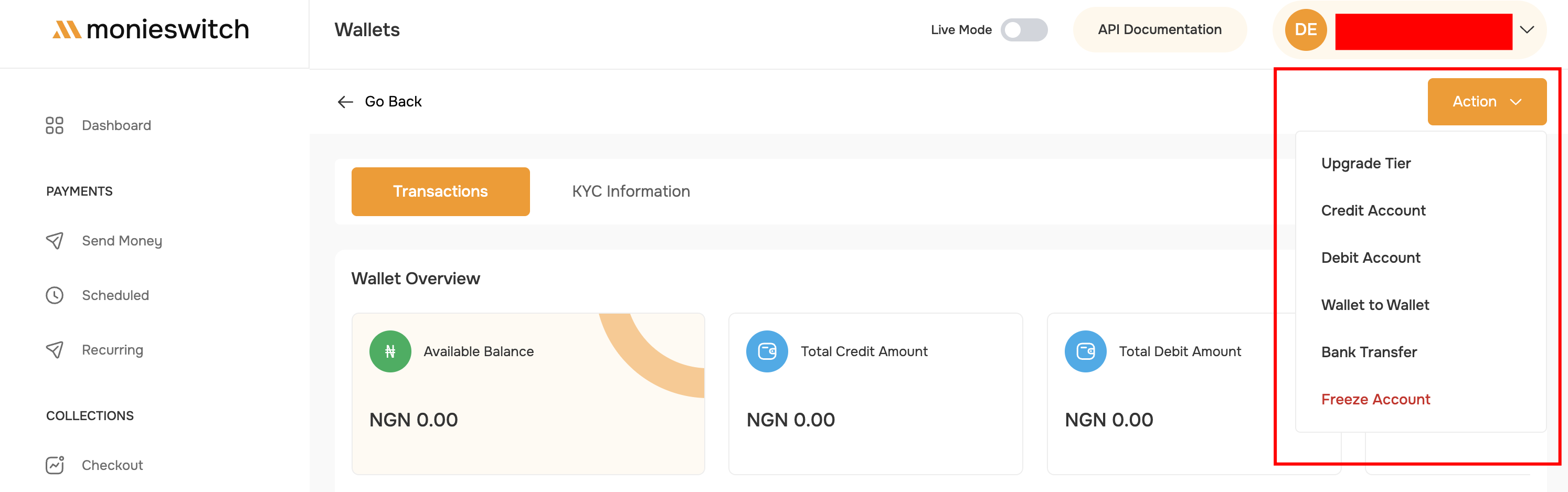 Enhance wallet capabilities and increase transaction limits
Add funds from merchant account to customer wallet
Withdraw funds from customer wallet to merchant account
Transfer funds between customer wallets
Send funds to any Nigerian bank account
Temporarily suspend or reactivate wallet operations
## Operation Limits & Rules
All operations are subject to tier-based daily limits:
* **Tier 1**: ₦50,000/day
* **Tier 2**: ₦200,000/day
* **Tier 3**: ₦5,000,000/day
Maximum balance caps apply: - **Tier 1**: ₦50,000 - **Tier 2**: ₦200,000 -
**Tier 3**: Unlimited
Current fee structure: - Wallet-to-wallet: ₦0 - Bank transfers: ₦10-25 -
Merchant operations: ₦0
Operation speed:
* Wallet operations: Instant
* Bank transfers: 1-5 minutes
* Verification: 24-48 hours
## Error Handling
Common error scenarios and solutions:
**Error**: Transaction amount exceeds available balance
**Solution**: Check wallet balance before initiating transactions or reduce transaction amount.
**Error**: Transaction would exceed daily tier limit
**Solution**: Wait until the next day (resets at midnight WAT) or upgrade wallet tier.
**Error**: Cannot process transactions on disabled wallet
**Solution**: Enable the wallet using the enable endpoint or contact support if frozen for compliance reasons.
**Error**: Merchant transaction PIN is incorrect
**Solution**: Verify your PIN in merchant settings. Contact support if locked out after multiple attempts.
**Error**: Wallet tier upgrade or operation requires additional verification
**Solution**: Complete the required KYC documentation for your target tier.
## Best Practices
* Never share merchant API keys
* Use environment variables for credentials
* Implement rate limiting
* Monitor suspicious activity
* Regularly rotate API keys
* Always check balance before debiting - Store transaction references -
Implement idempotency - Use metadata for tracking - Handle webhooks properly
* Implement retry logic - Log all API responses - Handle timeouts gracefully -
Provide user-friendly messages - Set up monitoring alerts
* Verify customer identity
* Maintain transaction records
* Report suspicious activity
* Follow tier requirements
* Keep KYC documents updated
***
## What's Next?
Learn about tier requirements and limits
View wallet details and balance information
Manage wallet status: freeze, unfreeze, upgrade tier
Credit, debit, and transfer funds between wallets
Enhance wallet capabilities and increase transaction limits
Add funds from merchant account to customer wallet
Withdraw funds from customer wallet to merchant account
Transfer funds between customer wallets
Send funds to any Nigerian bank account
Temporarily suspend or reactivate wallet operations
## Operation Limits & Rules
All operations are subject to tier-based daily limits:
* **Tier 1**: ₦50,000/day
* **Tier 2**: ₦200,000/day
* **Tier 3**: ₦5,000,000/day
Maximum balance caps apply: - **Tier 1**: ₦50,000 - **Tier 2**: ₦200,000 -
**Tier 3**: Unlimited
Current fee structure: - Wallet-to-wallet: ₦0 - Bank transfers: ₦10-25 -
Merchant operations: ₦0
Operation speed:
* Wallet operations: Instant
* Bank transfers: 1-5 minutes
* Verification: 24-48 hours
## Error Handling
Common error scenarios and solutions:
**Error**: Transaction amount exceeds available balance
**Solution**: Check wallet balance before initiating transactions or reduce transaction amount.
**Error**: Transaction would exceed daily tier limit
**Solution**: Wait until the next day (resets at midnight WAT) or upgrade wallet tier.
**Error**: Cannot process transactions on disabled wallet
**Solution**: Enable the wallet using the enable endpoint or contact support if frozen for compliance reasons.
**Error**: Merchant transaction PIN is incorrect
**Solution**: Verify your PIN in merchant settings. Contact support if locked out after multiple attempts.
**Error**: Wallet tier upgrade or operation requires additional verification
**Solution**: Complete the required KYC documentation for your target tier.
## Best Practices
* Never share merchant API keys
* Use environment variables for credentials
* Implement rate limiting
* Monitor suspicious activity
* Regularly rotate API keys
* Always check balance before debiting - Store transaction references -
Implement idempotency - Use metadata for tracking - Handle webhooks properly
* Implement retry logic - Log all API responses - Handle timeouts gracefully -
Provide user-friendly messages - Set up monitoring alerts
* Verify customer identity
* Maintain transaction records
* Report suspicious activity
* Follow tier requirements
* Keep KYC documents updated
***
## What's Next?
Learn about tier requirements and limits
View wallet details and balance information
Manage wallet status: freeze, unfreeze, upgrade tier
Credit, debit, and transfer funds between wallets